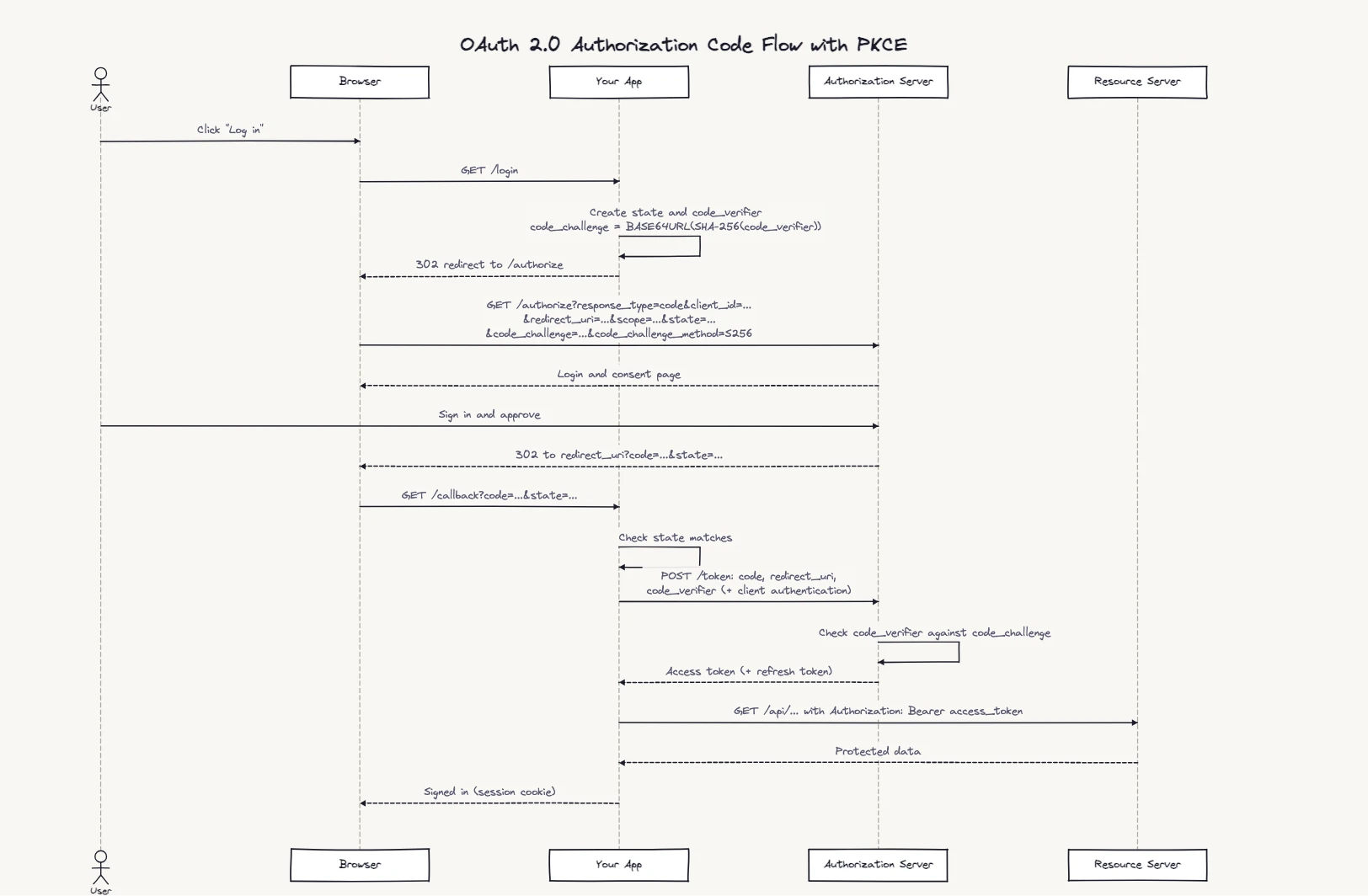
title OAuth 2.0 Authorization Code Flow with PKCE

actor User
participant Browser
participant "Your App" as App
participant "Authorization Server" as AS
participant "Resource Server" as RS

User->Browser: Click "Log in"
Browser->App: GET /login
App->App: Create state and code_verifier\ncode_challenge = BASE64URL(SHA-256(code_verifier))
App-->Browser: 302 redirect to /authorize
Browser->AS: GET /authorize?response_type=code&client_id=...\n&redirect_uri=...&scope=...&state=...\n&code_challenge=...&code_challenge_method=S256
AS-->Browser: Login and consent page
User->AS: Sign in and approve
AS-->Browser: 302 to redirect_uri?code=...&state=...
Browser->App: GET /callback?code=...&state=...
App->App: Check state matches
App->AS: POST /token: code, redirect_uri,\ncode_verifier (+ client authentication)
AS->AS: Check code_verifier against code_challenge
AS-->App: Access token (+ refresh token)
App->RS: GET /api/... with Authorization: Bearer access_token
RS-->App: Protected data
App-->Browser: Signed in (session cookie)
What this diagram shows
The diagram has two distinct legs. In the first, everything goes through the browser — the redirect to the provider, the login and consent screen, the redirect back with the auth code. In the second, the code is exchanged for a token server-to-server, away from the browser entirely.
That separation is the security model. An authorization code intercepted from the browser redirect is useless on its own: redeeming it takes the code_verifier that only your app holds (and, for a server-side app, its client credentials). The access token never reaches the browser, so it never ends up in history or logs. The diagram makes that boundary obvious in a way code alone doesn't.
Step-by-step flow breakdown
state value and a random code_verifier, and derives the code_challenge from it: the SHA-256 hash, base64url-encoded. It keeps both secrets on its side./authorize endpoint with response_type=code, client_id, redirect_uri, scope, state, code_challenge and code_challenge_method=S256. Only the hash travels through the browser, never the verifier.redirect_uri with a short-lived, single-use code and the same state.state doesn't match the value your app stored in step 1, stop. That check is what protects the callback against cross-site request forgery./token endpoint directly, server to server, with the code, the same redirect_uri and the original code_verifier. A confidential client also authenticates itself, for example with its client secret.code_verifier and compares it with the code_challenge from step 2. If they match, it returns an access token, and often a refresh token.When to use an OAuth sequence diagram
- SSO implementation docs — show the exact redirect chain so frontend and backend teams stay in sync
- Security review — prove the client secret and access tokens never pass through the front-channel
- Integrating a new provider — map out the provider-specific variations before coding
- Debugging auth failures — trace which step produced the error (invalid state, expired code, wrong redirect URI)
- Tech specs and RFCs — include the diagram alongside the implementation decision
Why PKCE is part of the main flow
PKCE (Proof Key for Code Exchange, RFC 7636) ties the token request to the browser session that started it. The redirect only carries a hash of the verifier, so someone who steals the authorization code still can't redeem it. RFC 9700, the current OAuth security best practice, says public clients such as single-page and mobile apps must use PKCE, recommends it for server-side apps too, and says clients should no longer use the implicit grant.
OpenID Connect variant
"Sign in with Google" and many other social logins are OpenID Connect, which runs the same code flow with openid in the scope. Two things change: your app should also send a random nonce, and the token response includes an ID token, a signed JWT that says who the user is. Before trusting it, your app checks the signature against the provider's published keys, that iss is the provider, that aud is your client ID, that exp hasn't passed, and that nonce matches.
title OpenID Connect Sign-in (Code Flow + PKCE)

actor User
participant Browser
participant "Your App" as App
participant "OpenID Provider" as OP

User->Browser: Click "Sign in"
Browser->App: GET /login
App->App: Create state, nonce and code_verifier
App-->Browser: 302 redirect to /authorize
Browser->OP: GET /authorize?response_type=code&client_id=...\n&redirect_uri=...&scope=openid email&state=...\n&nonce=...&code_challenge=...&code_challenge_method=S256
OP-->Browser: Login and consent page
User->OP: Sign in and approve
OP-->Browser: 302 to redirect_uri?code=...&state=...
Browser->App: GET /callback?code=...&state=...
App->App: Check state matches
App->OP: POST /token: code, redirect_uri,\ncode_verifier (+ client authentication)
OP-->App: id_token + access token
App->App: Validate id_token: signature, iss,\naud = client_id, exp, nonce
App-->Browser: Signed in as the id_token's subject
Common mistakes this diagram helps catch
- Skipping the state check. Without it, an attacker can complete the flow in the victim's browser with their own code.
- Putting a client secret in a single-page or mobile app. Anything shipped to the client can be extracted. Those apps are public clients: they rely on PKCE, not a secret.
- Trusting an ID token without validating it. Decoding a JWT isn't verifying it. Check the signature and the
iss,aud,expandnonceclaims.
Refreshing an expired access token
Access tokens are short-lived. When one expires, your app sends the refresh token to /token with grant_type=refresh_token and gets a new access token, without sending the user through the login again. It's worth drawing as its own short sequence.
Related sequence diagram examples
Frequently asked questions
How does the OAuth 2.0 authorization code flow work?
Your app redirects the user to the authorization server with a state and a PKCE code_challenge → the user logs in and grants consent → the server redirects back with a one-time authorization code → your app checks state and exchanges the code plus the code_verifier for an access token, server to server → your app uses the access token to call APIs on the user's behalf.
What is the difference between OAuth 2.0 and OpenID Connect?
OAuth 2.0 is an authorization framework — it grants apps access to resources. OpenID Connect (OIDC) adds an identity layer: it returns an ID token (JWT) with user profile claims, enabling authentication (login) not just resource access.
Why is the authorization code exchanged server-side?
The exchange needs the code_verifier, and for a server-side app its client credentials, neither of which should be exposed in the browser. Doing it server to server also keeps the access token out of browser history and front-end logs.
Can I edit this OAuth 2.0 diagram?
Yes. Click Open in Editor on either diagram, rename the participants for your provider (GitHub, Auth0, Okta, Microsoft Entra ID), or add a refresh-token step. Export as PNG or SVG, or as Mermaid or PlantUML; here's how the two formats compare. Free, no account required.