title Stripe Payment: PaymentIntent + Webhook

actor Customer
participant "Web App" as App
participant "Your Server" as Server
participant Stripe
participant Database

Customer->App: Click "Pay now"
App->Server: POST /checkout (order id)
Server->Stripe: POST /v1/payment_intents (amount, currency)
Stripe-->Server: PaymentIntent with client_secret
Server-->App: client_secret only
Customer->App: Enter card details in Stripe's Payment Element
App->Stripe: stripe.confirmPayment(client_secret)
Stripe-->App: Result to show the customer
Stripe->Server: Webhook: payment_intent.succeeded\n(signed, Stripe-Signature header)
Server->Server: Verify signature, skip already-seen event IDs
Server-->Stripe: 200 OK
Server->Database: UPDATE order SET status = paid
App->Server: GET /orders/:id
Server-->App: status = paid
App-->Customer: Order confirmation
What this diagram shows
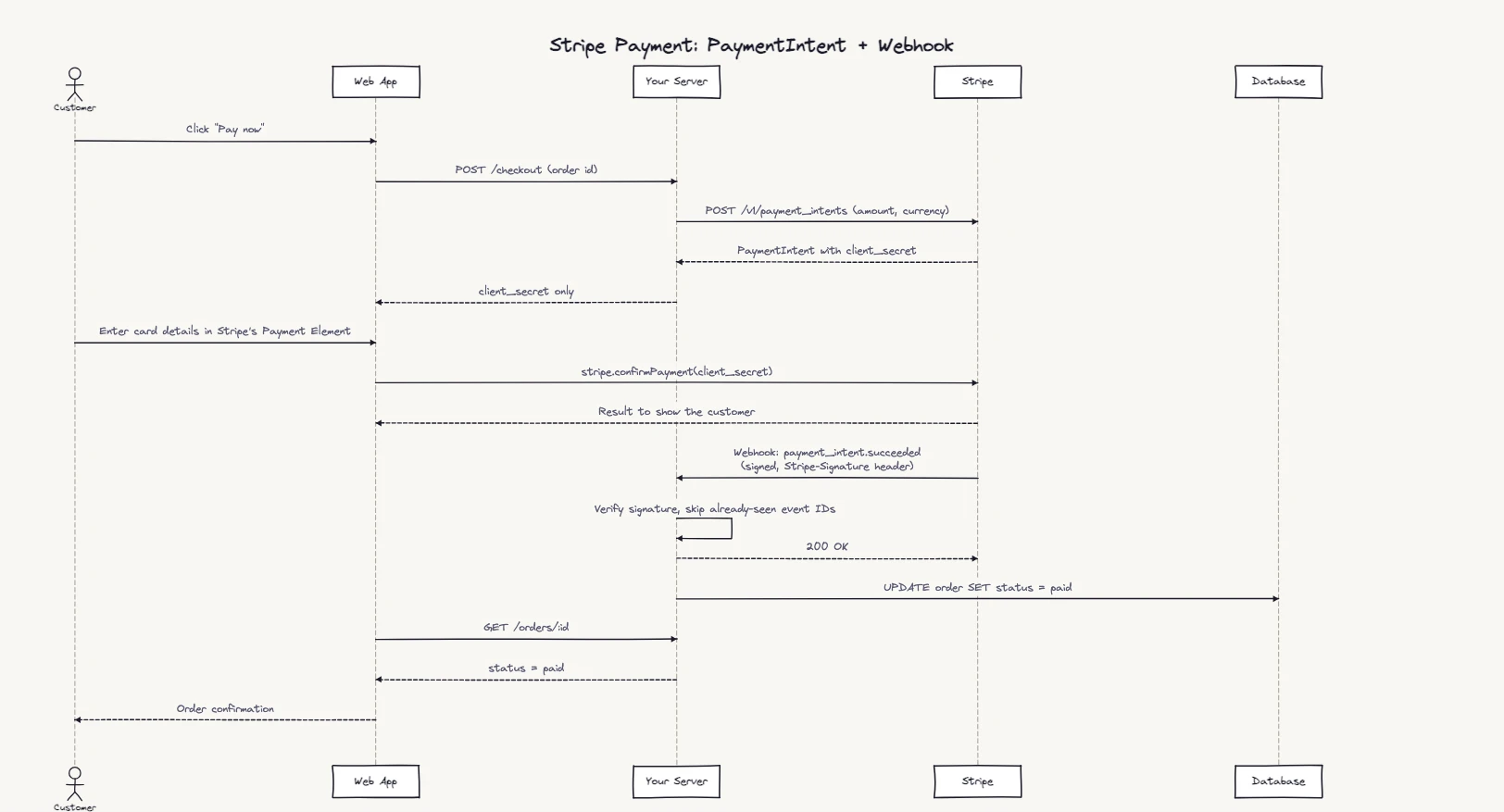
Five participants, two distinct concerns. The first half is synchronous: your server creates a PaymentIntent and the customer pays in Stripe's Payment Element. The second half is asynchronous: Stripe sends a webhook to your server, and that's where the order gets marked paid.
The diagram makes explicit that card data never reaches your server: the customer types it into Stripe-hosted fields. That's the PCI compliance benefit, and it's invisible in code until you draw the full sequence.
Stripe now recommends its Checkout Sessions API with the Payment Element for most new integrations. The shape of this diagram stays the same either way: the browser shows a result, and fulfilment happens in the webhook handler.
Step-by-step flow breakdown
POST /v1/payment_intents with the amount and currency, plus the order ID in metadata if you want to reconcile later. Stripe returns the PaymentIntent, including its client_secret. If checkout is interrupted and resumes, reuse the same PaymentIntent rather than creating another.client_secret to the app, not the whole PaymentIntent. Don't log it or put it in a URL: anyone holding it can complete that payment.stripe.confirmPayment with the client secret. Stripe handles any extra authentication, such as 3D Secure, and the app gets a result to show. That result is for the customer's screen, not your signal to fulfil the order.payment_intent.succeeded event to your webhook endpoint, signed in the Stripe-Signature header. Verify that signature with your endpoint's signing secret before trusting the event.When to use a payment sequence diagram
- Checkout implementation docs — show frontend devs exactly when to call your backend vs. when to talk to Stripe directly
- Security review — prove that card data never flows through your server
- Webhook design — document which events trigger which business logic and in what order
- Idempotency planning — trace the flow to identify where duplicate events could cause double-fulfilment
- Incident review — replay a failed payment sequence to find where the flow broke
Common variations
Subscription / recurring billing
Add a Stripe->Server: Webhook: invoice.payment_succeeded step on a recurring schedule. Your handler renews the subscription in the database rather than marking an order paid.
Refund flow
Add a separate flow starting with Customer->App: Request refund, App->Stripe: POST /v1/refunds, and a charge.refunded webhook updating the order to refunded.
PayPal or other providers
Replace the Stripe participant with your payment provider. The webhook-confirmation pattern is the same across Stripe, Braintree, PayPal, and most modern PSPs.
Payment failure handling
Add an alt fragment: [success] running the happy path and [failure] showing payment_intent.payment_failed triggering a retry email.
Related sequence diagram examples
Frequently asked questions
How does a Stripe payment flow work in sequence?
Your server creates a PaymentIntent and passes its client_secret to the browser → the customer enters card details in Stripe's Payment Element → Stripe.js confirms the payment → Stripe sends a signed payment_intent.succeeded webhook to your server → your server acknowledges it and marks the order paid. Card data never touches your server.
What is a payment sequence diagram used for?
It documents the exact order of messages during checkout — useful for implementation docs, security reviews, webhook design, and debugging payment failures in production.
Can I edit this payment processing diagram?
Yes — click Open in Editor above. Modify participants, add your own services, adapt to PayPal or another provider, then export as PNG, SVG, or Mermaid. Free, no account needed.
Why does the webhook come before the frontend confirmation?
Webhooks are the authoritative payment signal — they arrive asynchronously from Stripe after the card is charged. The frontend shouldn't assume payment succeeded based on the result Stripe.js returns to the browser alone; it should wait for the webhook to update order state, then display confirmation.