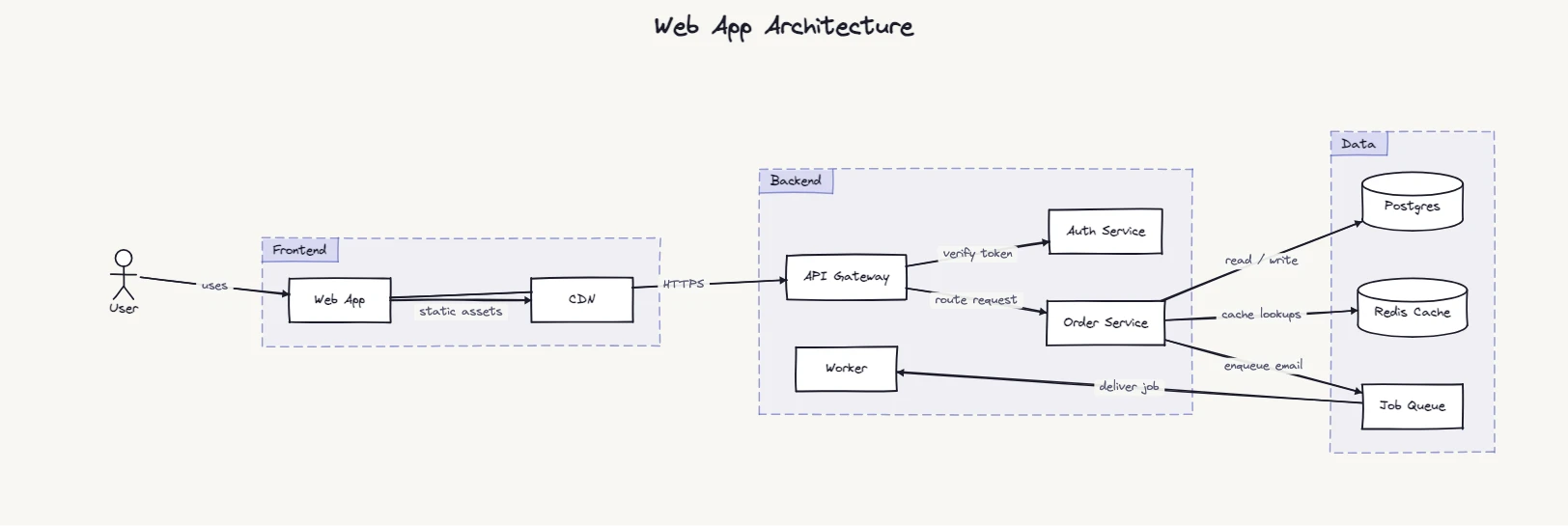
title Web App Architecture

type actor User
type group Frontend
type group Backend
type group Data
type database Postgres
type database "Redis Cache"

User -> Web App: uses
Web App -> CDN: static assets
Web App -> API Gateway: HTTPS
API Gateway -> Auth Service: verify token
API Gateway -> Order Service: route request
Order Service -> Postgres: read / write
Order Service -> "Redis Cache": cache lookups
Order Service -> Job Queue: enqueue email
Job Queue -> Worker: deliver job

Web App, CDN in Frontend
API Gateway, Auth Service, Order Service, Worker in Backend
Postgres, "Redis Cache", Job Queue in Data
What this diagram shows
A fairly ordinary web application, drawn the way you'd explain it to someone on their first day: what the user touches, what runs your code, and where the state lives. The three labelled boxes are the part that matters. Without them this is eleven boxes and nine arrows. With them it reads as three tiers, and the arrows that cross a boundary are the ones worth talking about.
The boxes are groups. You declare one with type group Backend, then say what's inside it: API Gateway, Auth Service, Order Service, Worker in Backend. The layout keeps members together and draws the box around them, with the name on its top-left corner.
Step-by-step flow breakdown
How the grouping syntax works
Three things to know, and then you can restructure this for your own system:
- Declare, then fill.
type group Datacreates the box.Postgres, "Redis Cache", Job Queue in Dataputs nodes in it. The membership line can go anywhere in the source, and the diagram comes out the same. belongs tois the long form ofin.Worker belongs to Backenddoes the same thing, and it creates the group if you never declared it.- Groups nest. Put a group inside another one (
Backend belongs to "AWS eu-west-1") to show a region, a VPC or a team boundary around several tiers.
The full rules are in the groups section of the syntax guide.
When to use an architecture diagram like this
- Onboarding. One picture of what talks to what, before anyone opens the repo.
- Design reviews, where the question is usually "which box owns this?"
- A README or ADR that needs a diagram you can still edit in six months, because the source is ten lines of text next to it.
- Incident write-ups. Mark the path the failing request took.
Common variations
Group by team instead of tier
Same nodes, different boxes: Auth Service in "Identity team", Order Service, Worker in "Checkout team". Useful when the real question is who to page.
Cloud accounts and regions
Wrap the tiers in an outer group: Frontend, Backend, Data belongs to "Production account". Add a second account next to it for staging.
Third-party services
Leave them outside every group. Stripe or SendGrid sitting on its own, outside your boxes, shows at a glance what you don't control.
Related flow diagram examples
Frequently asked questions
How do I draw a box around several components?
Declare a group and list its members: type group Backend, then API Gateway, Auth Service in Backend. The box is drawn around the members with the group name on its corner.
Can I write an architecture diagram as text?
Yes. Each arrow is one line (Web App -> API Gateway: HTTPS), databases and people get a type line, and groups draw the boundaries. The text can live in your repo next to the code it describes.
Is this a C4 or UML tool?
No. There is no C4 or UML notation here, only boxes, cylinders, people, groups and labelled arrows. It is meant for the quick picture you would otherwise draw on a whiteboard, which is often all a container-level view needs.
Can I move things around after the layout?
Yes. Drag any node in the editor and its group box stretches to follow. Positions are kept in the share link.